Tag: AZ-104

  • Subnetting Makes Sense When You Meet the ISP

    Subnetting in the real world.
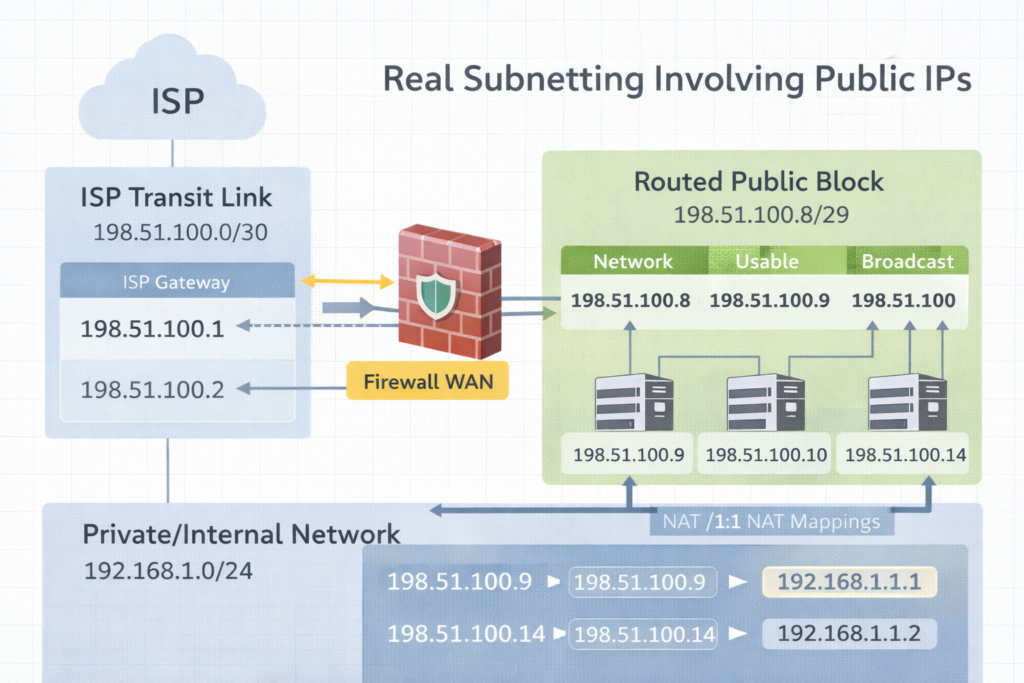
    A /30 is the transit bridge to the ISP.
    The routed /29 is the public space you actually use behind the firewall.

    Excerpt
    Subnetting clicks when you stop treating it like math and start treating it like design. The moment you get public IPs from an ISP like Comcast, you realize there are two stories happening at once. The transit link that connects you to the ISP, and the routed public block you can actually use inside your firewall.


    Intro
    Subnetting is the practice of dividing an IP space into smaller networks so routing, security, and growth stay predictable. That sounds academic until you get a real ISP handoff and suddenly someone says, “Here’s a /30,” and you discover you only get one IP you can assign. Then they also give you a /29, and you are told those are your public LAN IPs, but they do not live on your WAN port the way you think they do.

    This post will make that feel normal.


    Notes from the Author
    Subnetting became real for me when Comcast handed us public IP space and the physical reality did not match the training diagrams. I learned there is a difference between an ISP transit network and a routed block. Once you see that difference, /29 and /30 stop being confusing and start being tools.


    Perspective
    What is subnetting
    Subnetting is splitting a network into smaller networks by borrowing bits from the host portion and adding them to the network portion. The prefix length, like /24 or /30, tells you how many bits are network bits.

    Why it is necessary

    1. Routing clarity
      Routers make decisions based on networks, not individual IPs.
    2. Security boundaries
      Separate systems by function. Users, servers, guests, printers, management.
    3. Broadcast control
      Smaller broadcast domains reduce noise and improve performance.
    4. Clean growth
      You can expand without renumbering everything if you plan.

    Two ISP stories you must separate
    Story 1: The transit link, often a /30 or /31
    This is the point to point connection between your firewall WAN interface and the ISP. It is not your “public LAN block.” It is just the link.

    Story 2: The routed block, often a /29, /28, or larger
    These are the public IPs you can use for NAT, 1:1 mappings, public services, or DMZ addresses. The ISP routes that block to you through the WAN link.

    This is why people say, “Comcast gave me a /30 and I only have one usable IP.”
    In a /30 there are 4 addresses total. Two are usable, but one is almost always used by the ISP side, and the other is used by your WAN interface. That leaves you with only one you can assign on your equipment, which makes it feel like “one usable.” That is normal.


    Practice Today (Not Someday)
    Here are easy to very difficult examples with answers. Read them in order. The goal is understanding, not speed.

    Example 1, easy
    Network: 192.168.1.0/24
    Question: How many usable IPs, and what is the usable range

    Answer
    Mask: 255.255.255.0
    Total: 256
    Usable: 254
    Network: 192.168.1.0
    Broadcast: 192.168.1.255
    Usable: 192.168.1.1 to 192.168.1.254

    Example 2, easy to medium
    Requirement: at least 50 devices
    Base: 192.168.10.0
    Question: What prefix fits, and what is the first subnet range

    Answer
    Need at least 50 hosts. Next power of two is 64 addresses.
    64 addresses means /26.
    Mask: 255.255.255.192
    First subnet: 192.168.10.0/26
    Network: 192.168.10.0
    Broadcast: 192.168.10.63
    Usable: 192.168.10.1 to 192.168.10.62

    Example 3, medium
    Network: 10.20.30.0/27
    Question: What is the usable range and how many usable IPs

    Answer
    /27 means 32 addresses
    Usable: 30
    Network: 10.20.30.0
    Broadcast: 10.20.30.31
    Usable: 10.20.30.1 to 10.20.30.30

    Example 4, public IP reality check, /30 transit
    Comcast gives you: 203.0.113.8/30
    Question: What are the four addresses, and which one do you typically put on your firewall WAN

    Answer
    /30 is 4 addresses total, increments of 4
    Block: 203.0.113.8 to 203.0.113.11

    Network: 203.0.113.8
    Usable: 203.0.113.9 and 203.0.113.10
    Broadcast: 203.0.113.11

    Typical assignment
    ISP gateway: 203.0.113.9
    Your firewall WAN: 203.0.113.10
    This is why it feels like you only got one usable IP. You only got one usable IP for your side. The other usable belongs to the ISP side.

    Example 5, common ISP setup, /30 transit plus routed /29
    Comcast gives you two things

    1. Transit: 198.51.100.0/30
    2. Routed block: 198.51.100.8/29 routed to your WAN IP

    Question A: What goes on the WAN interface
    Question B: What is the usable range of the /29 and how do you actually use it

    Answer A, WAN interface
    Transit /30 block is 198.51.100.0 to 198.51.100.3
    Network: 198.51.100.0
    Usable: 198.51.100.1 and 198.51.100.2
    Broadcast: 198.51.100.3

    Typical
    ISP gateway: 198.51.100.1
    Your WAN: 198.51.100.2

    Answer B, routed /29
    /29 is 8 addresses total, increments of 8
    Block: 198.51.100.8 to 198.51.100.15
    Network: 198.51.100.8
    Broadcast: 198.51.100.15
    Usable: 198.51.100.9 to 198.51.100.14

    How you use it
    These /29 addresses usually do not get placed directly on the WAN interface. Instead, the ISP routes that entire /29 to your WAN IP on the transit /30. Then inside your firewall you can use them for:

    • 1:1 NAT mappings to internal hosts
    • Public VIPs on a DMZ interface
    • NAT pools
    • Assigning a public IP to a specific service

    The key phrase you ask Comcast for is: “Confirm the routed block is routed to my WAN IP and provide the next hop.”
    That next hop is your WAN IP on the /30.

    Example 6, difficult, find the /29 block and answer fast
    Given public IP: 64.71.22.14/29
    Question: What is the network, broadcast, usable range

    Answer
    /29 increments by 8 in the last octet
    Find the nearest multiple of 8 less than or equal to 14
    8 and 16 bracket it, so network is 8

    Network: 64.71.22.8
    Broadcast: 64.71.22.15
    Usable: 64.71.22.9 to 64.71.22.14

    Example 7, difficult, build a WAN /30 from a random IP
    You are told your WAN IP is 75.120.44.6/30
    Question: What is the /30 block and what is the ISP gateway likely to be

    Answer
    /30 increments by 4
    Nearest multiple of 4 less than or equal to 6 is 4
    So block is 75.120.44.4 to 75.120.44.7

    Network: 75.120.44.4
    Usable: 75.120.44.5 and 75.120.44.6
    Broadcast: 75.120.44.7

    Likely
    ISP gateway: 75.120.44.5
    Your WAN: 75.120.44.6

    Example 8, very difficult, design for two ISPs with clean routing
    Requirement

    • ISP1 gives transit /30 and routed /29
    • ISP2 gives transit /30 and routed /29
      You want to publish two services, one primary on ISP1, one primary on ISP2, with failover possible later.

    Answer concept

    • Put only the transit /30 on each WAN interface
    • Confirm each routed /29 is routed to the correct WAN IP
    • Publish Service A using a public IP from ISP1 routed /29 with 1:1 NAT to internal host
    • Publish Service B using a public IP from ISP2 routed /29 with 1:1 NAT to internal host
    • Keep internal addressing private RFC1918 and do not mix public blocks inside LAN unless you have a real DMZ plan
    • Make sure the firewall supports policy based routing or proper default route tracking if you plan failover

    This is where subnetting meets design.


    Final Reflection
    Subnetting is not about counting. It is about ownership. When you know which addresses belong to the link, which belong to your routed block, and which belong to your internal network, you stop feeling confused. You start feeling calm.


    Pocket I’m Keeping
    The /30 is the bridge.
    The routed /29 is the usable land.


    What I Hear Now
    I can design this with intention.
    I can separate the transit from the routed block.
    I can explain it clearly to anyone on the team.


    © 2012–2026 Jet Mariano. All rights reserved.
    For usage terms, please see the Legal Disclaimer.
  • 🖥️ Path to Become an Infrastructure Engineer (Ivy Falls)

    From Customer Service Rep to PC Specialist, Network Engineer, System Administrator, DevSecOps, and now Infrastructure Engineer — a journey built on faith, discipline, dedication, and gratitude.

    Introduction: The Path Is the Practice

    My story didn’t begin with servers or certifications.
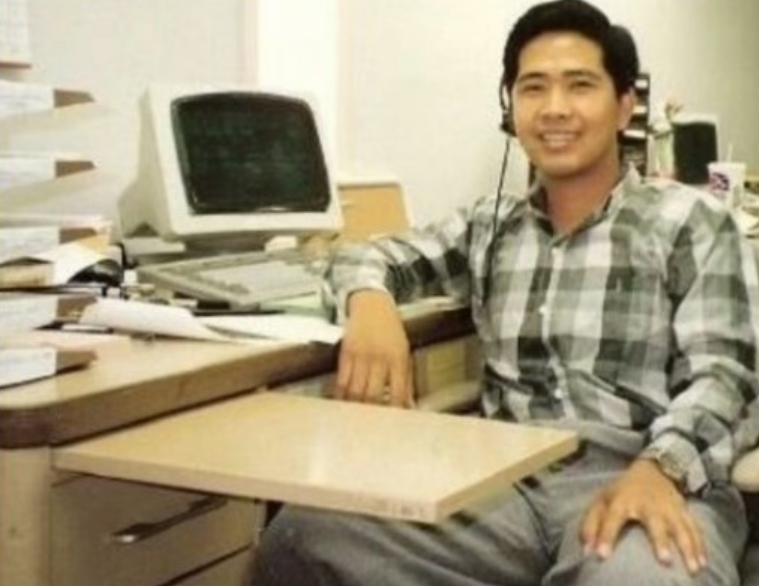
    It began at All Electronics Corporation in Van Nuys, California, where I worked full-time from 6:30 A.M. to 3:00 P.M., taking two Metro buses and walking a block from the station — rain or shine — from December 1990 to late 1995.

    I woke as early as 4 A.M. to catch the first bus at Western and 3rd Street in Los Angeles, sometimes heading straight to my evening shift at the Taco Bell drive-thru in Glendale.
    Those were humble, exhausting days that taught me discipline and grit — lessons that would shape every part of my career.

    At All Electronics, I became fascinated by the IC — Integrated Circuit, the heart of every desktop computer. I wanted to understand it, not just sell it.

    Back in my Koreatown apartment, I turned curiosity into calling.
    No Google. No YouTube. No AI.
    Just library books and endless nights of self-study. I intentionally crashed my computers and rebuilt them until every fix became muscle memory.

    Once confident, I started offering free repairs and computer lessons to friends, relatives, and senior citizens — setting up printers, fixing networks, and teaching email basics. Those acts of service opened the door to my first full-time IT job at the University of Southern California (USC) as a PC Specialist.

    I still remember waiting at the bus stop in the dark, dreaming of the day I wouldn’t have to ride in the rain. Years later, those same dreams became reality — not through luck, but through faith, discipline, dedication, and gratitude.
    The rides changed — from buses to a BMW, an Audi, and now a Tesla — but what never changed was the purpose: to keep moving forward while staying grounded in gratitude.


    Season of Refinement

    While working full-time at USC, I entered what I call my season of refinement.
    By day I supported campus systems and users; by night I was a full-time student at Los Angeles City College (LACC) and a weekend warrior at DeVry University, studying Management in Telecommunications.

    It was during this time that Microsoft introduced the MCSE (Microsoft Certified Systems Engineer) program.
    One of my professors at LACC encouraged me to earn it, saying, “Once you have that license, companies will chase you.”
    He was right — that MCSE became my ticket to GTE (now Verizon), my first step into enterprise-scale IT.

    My tenure at GTE was brief because Aerospace came calling with a six-figure offer just before Y2K — an opportunity too good to refuse.
    After Aerospace, I founded my own consulting firm — Ahead InfoTech (AIT) — and entered what I now call my twelve years of plenty.

    One of my earliest major clients, USC Perinatal Group, asked me to design and implement a secure LAN/WAN connecting satellite offices across major hospitals including California Hospital Medical Center, Saint Joseph of Burbank and Mission Hills, and Hollywood Presbyterian Hospital.
    We used T1 lines with CSU/DSU units and Fortinet firewalls; I supplied every workstation and server under my own AIT brand.

    Through that success I was referred to additional projects for Tarzana and San Gabriel Perinatal Groups, linked by dedicated frame-relay circuits — early-era networking at its finest.
    Momentum led to new partnerships with The Claremont Colleges and the City of West Covina, where I served as Senior Consultant handling forensic analysis and SMTP/email engineering.

    Word spread. One attorney client introduced me to an opportunity in American Samoa to help design and build a regional ISP, and later to a contract with Sanyo Philippines.
    During this period Fortinet was still new, and I became one of its early resellers.
    Refusing to rely on mass-produced systems, I built AIT servers and workstations from the ground up for every environment.
    DSL was just emerging, yet most clients still relied on dedicated T1s — real hands-on networking that demanded precision and patience.

    Those were the twelve years of plenty — projects that stretched from local hospitals to overseas data links, from LAN cables to international circuits.
    By the time AWS arrived in 2006 and Azure followed in 2010, I had already been building and managing distributed networks for years.

    When I returned to Corporate America, my first full-time role was at Payforward, where I led the On-Prem to AWS migration, designing multi-region environments across US-East (1a and 1b) and US-West, complete with VPCs, subnets, IAM policies, and full cloud security.
    That’s when I earned my AWS certifications, completing a journey that had begun with physical servers and matured in the cloud.

    Education, experience, and certification merged into one lesson:
    Discipline comes first. Validation follows.
    Degrees and credentials were never my starting line — they were the icing on the cake of years of practice, service, and faith.


    My Philosophy: One Discipline, Many Forms

    Whether in Martial Arts, IT, or Photography, mastery comes from repetition, humility, and curiosity.
    As Ansel Adams wrote:

    “When words become unclear, I shall focus with photographs. When images become inadequate, I shall be content with silence.”

    Everyone can take a photo; not everyone captures a masterpiece.
    Everyone can study tech; not everyone understands its rhythm.
    Excellence lives in awareness — the moment when curiosity meets purpose.


    The Infrastructure Engineer Path

    1️⃣ Foundations

    Learn the essentials: Windows Server, Active Directory, DNS/DHCP, GPOs, Networking (VLANs, VPNs), Linux basics, and PowerShell.
    Free Resources:

    2️⃣ Cloud Platforms

    Start with AZ-104 Azure Administrator.
    Use free tiers to lab: Azure | AWS | GCP.
    Courses:

    3️⃣ Automation & DevOps

    Learn IaC (Terraform/Bicep), Docker, Kubernetes, and CI/CD.
    Watch TechWorld with Nana.

    4️⃣ Labs & Simulators

    No hardware? Try:

    5️⃣ Portfolio

    Document every lab, build diagrams, post scripts on GitHub, and write short lessons learned.


    Final Reflection

    From bus stops to boardrooms, from fixing desktops to deploying clouds — the principles never changed: serve first, learn always, and build things that last.
    This blog will continue to evolve as technology changes — come back often and grow with it.


    🪶 Closing Note

    I share this story not to boast, but to inspire those still discovering their own path in technology.
    Everything here is told from personal experience and memory; if a date or detail differs from official records, it’s unintentional.
    I’m grateful for mentors like my LACC professor, who once told me to look up a name not yet famous — Bill Gates — and earn my MCSE + I.
    He was right: that single decision opened countless doors.

    I don’t claim to know everything; I simply kept learning, serving, and sharing.
    My living witnesses are my son, my younger brother, and friends who once worked with me and now thrive in IT.
    After all these years, I’m still standing — doing what I love most: helping people through Information Technology.


    ⚖️ Legal Disclaimer

    All events and company names mentioned are described from personal recollection for educational and inspirational purposes only. Any factual inaccuracies are unintentional. Opinions expressed are my own and do not represent any past or current employer.

    © 2012–2025 Jet Mariano. All rights reserved.
    For usage terms, please see the Legal Disclaimer.
  • Because I Have Been Given Much, I Too Must Give

    Because I Have Been Given Much, I Too Must Give

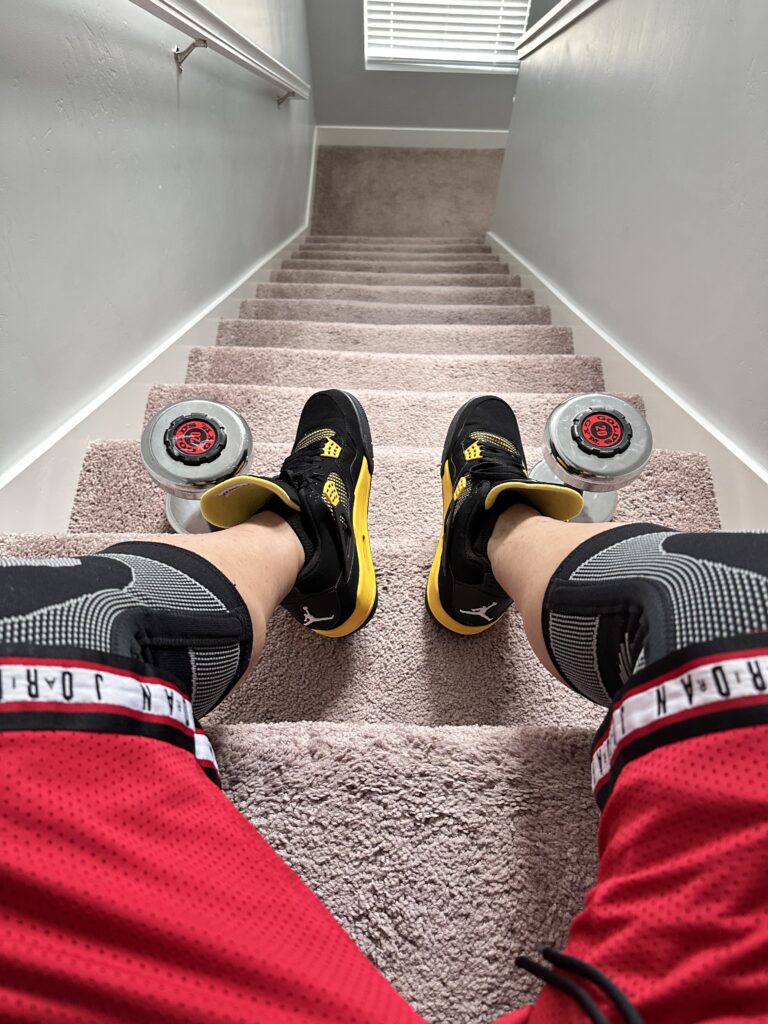
    Jordan 4s laced, knee braces locked, and 20s in hand—another stair session. I train to stay ready, not just fit.

    I train to stay rooted in purpose, faithful in service, and prepared for life’s demands.
    Fitness clears my mind and sharpens my focus.
    The goal isn’t just strength—it’s being able to make a difference.

    That’s why I wear McDavid knee braces, elbow support, and back support. My workouts are non-stop—compound, high-rep, and uninterrupted. You have to train smart. No shortcuts. No injuries.

    Tonight’s training flow?

    • 30-minute stair run (1st floor to basement, non-stop)
    • 120 reps each of:
      • Pushups
      • Sit-ups
      • Leg raises
      • Abs crunches
    • Bird/Dog exercise for balance and core control
    • Crab-walks to engage hip and glute strength
    • 20-minute plank rotation
    • All while my laundry spins in the background
    • Tilapia fillets thawed and ready for a clean dinner
    • Playlist? Pure Church music, filling the air with purpose

    This is a multi-tasked project of body, spirit, and home.


    During sacrament, the hymn “Because I Have Been Given Much” played softly—but its message roared inside me.

    It asked me:
    What are you giving in return?

    I reflected:

    👉🏼 I give my focus to study—choosing AZ-104 over passive scrolling
    👉🏼 I give my energy to fitness—choosing movement over comfort
    👉🏼 I give my rest to quality sleep—choosing recovery over distraction
    👉🏼 I give my time to the Lord—choosing temple service over idle time
    👉🏼 I give my work my best—choosing to document, secure, and improve

    This isn’t boasting. This is realignment.
    When you’ve been preserved, protected, and placed where you are for a purpose—
    you can’t just sit still.

    You move.
    You give.
    You train.
    You serve.
    Because you’ve been given much.

    And what you give in return becomes your praise.

    © 2012–2025 Jet Mariano. All rights reserved.
    For usage terms, please see the Legal Disclaimer.

error: Content is protected !!