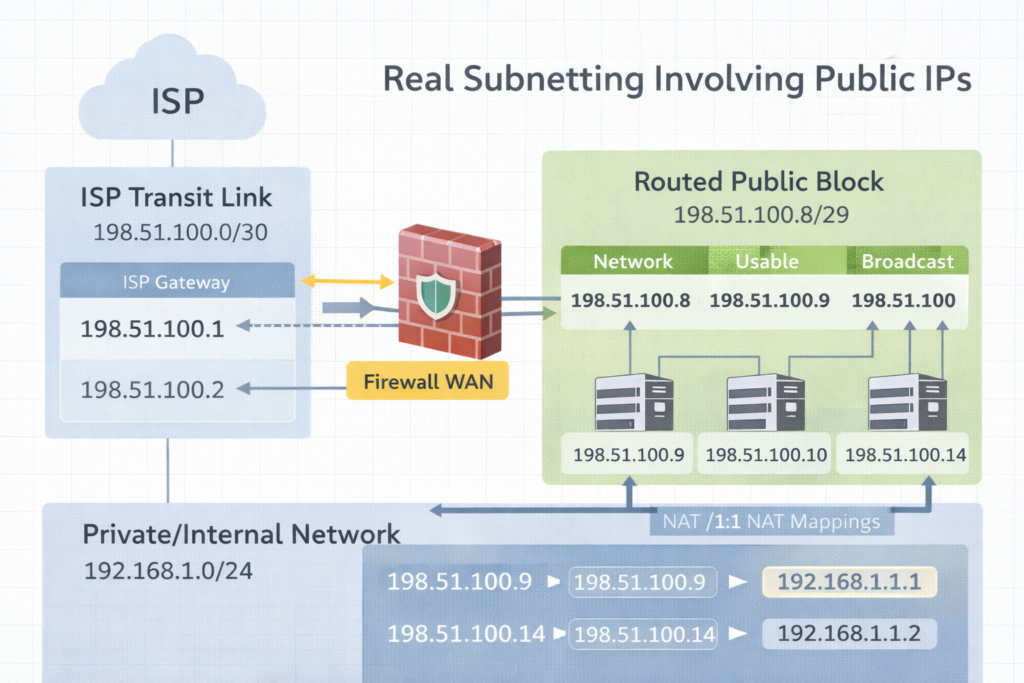
A /30 is the transit bridge to the ISP.
The routed /29 is the public space you actually use behind the firewall.
Excerpt
Subnetting clicks when you stop treating it like math and start treating it like design. The moment you get public IPs from an ISP like Comcast, you realize there are two stories happening at once. The transit link that connects you to the ISP, and the routed public block you can actually use inside your firewall.
Intro
Subnetting is the practice of dividing an IP space into smaller networks so routing, security, and growth stay predictable. That sounds academic until you get a real ISP handoff and suddenly someone says, “Here’s a /30,” and you discover you only get one IP you can assign. Then they also give you a /29, and you are told those are your public LAN IPs, but they do not live on your WAN port the way you think they do.
This post will make that feel normal.
Notes from the Author
Subnetting became real for me when Comcast handed us public IP space and the physical reality did not match the training diagrams. I learned there is a difference between an ISP transit network and a routed block. Once you see that difference, /29 and /30 stop being confusing and start being tools.
Perspective
What is subnetting
Subnetting is splitting a network into smaller networks by borrowing bits from the host portion and adding them to the network portion. The prefix length, like /24 or /30, tells you how many bits are network bits.
Why it is necessary
- Routing clarity
Routers make decisions based on networks, not individual IPs. - Security boundaries
Separate systems by function. Users, servers, guests, printers, management. - Broadcast control
Smaller broadcast domains reduce noise and improve performance. - Clean growth
You can expand without renumbering everything if you plan.
Two ISP stories you must separate
Story 1: The transit link, often a /30 or /31
This is the point to point connection between your firewall WAN interface and the ISP. It is not your “public LAN block.” It is just the link.
Story 2: The routed block, often a /29, /28, or larger
These are the public IPs you can use for NAT, 1:1 mappings, public services, or DMZ addresses. The ISP routes that block to you through the WAN link.
This is why people say, “Comcast gave me a /30 and I only have one usable IP.”
In a /30 there are 4 addresses total. Two are usable, but one is almost always used by the ISP side, and the other is used by your WAN interface. That leaves you with only one you can assign on your equipment, which makes it feel like “one usable.” That is normal.
Practice Today (Not Someday)
Here are easy to very difficult examples with answers. Read them in order. The goal is understanding, not speed.
Example 1, easy
Network: 192.168.1.0/24
Question: How many usable IPs, and what is the usable range
Answer
Mask: 255.255.255.0
Total: 256
Usable: 254
Network: 192.168.1.0
Broadcast: 192.168.1.255
Usable: 192.168.1.1 to 192.168.1.254
Example 2, easy to medium
Requirement: at least 50 devices
Base: 192.168.10.0
Question: What prefix fits, and what is the first subnet range
Answer
Need at least 50 hosts. Next power of two is 64 addresses.
64 addresses means /26.
Mask: 255.255.255.192
First subnet: 192.168.10.0/26
Network: 192.168.10.0
Broadcast: 192.168.10.63
Usable: 192.168.10.1 to 192.168.10.62
Example 3, medium
Network: 10.20.30.0/27
Question: What is the usable range and how many usable IPs
Answer
/27 means 32 addresses
Usable: 30
Network: 10.20.30.0
Broadcast: 10.20.30.31
Usable: 10.20.30.1 to 10.20.30.30
Example 4, public IP reality check, /30 transit
Comcast gives you: 203.0.113.8/30
Question: What are the four addresses, and which one do you typically put on your firewall WAN
Answer
/30 is 4 addresses total, increments of 4
Block: 203.0.113.8 to 203.0.113.11
Network: 203.0.113.8
Usable: 203.0.113.9 and 203.0.113.10
Broadcast: 203.0.113.11
Typical assignment
ISP gateway: 203.0.113.9
Your firewall WAN: 203.0.113.10
This is why it feels like you only got one usable IP. You only got one usable IP for your side. The other usable belongs to the ISP side.
Example 5, common ISP setup, /30 transit plus routed /29
Comcast gives you two things
- Transit: 198.51.100.0/30
- Routed block: 198.51.100.8/29 routed to your WAN IP
Question A: What goes on the WAN interface
Question B: What is the usable range of the /29 and how do you actually use it
Answer A, WAN interface
Transit /30 block is 198.51.100.0 to 198.51.100.3
Network: 198.51.100.0
Usable: 198.51.100.1 and 198.51.100.2
Broadcast: 198.51.100.3
Typical
ISP gateway: 198.51.100.1
Your WAN: 198.51.100.2
Answer B, routed /29
/29 is 8 addresses total, increments of 8
Block: 198.51.100.8 to 198.51.100.15
Network: 198.51.100.8
Broadcast: 198.51.100.15
Usable: 198.51.100.9 to 198.51.100.14
How you use it
These /29 addresses usually do not get placed directly on the WAN interface. Instead, the ISP routes that entire /29 to your WAN IP on the transit /30. Then inside your firewall you can use them for:
- 1:1 NAT mappings to internal hosts
- Public VIPs on a DMZ interface
- NAT pools
- Assigning a public IP to a specific service
The key phrase you ask Comcast for is: “Confirm the routed block is routed to my WAN IP and provide the next hop.”
That next hop is your WAN IP on the /30.
Example 6, difficult, find the /29 block and answer fast
Given public IP: 64.71.22.14/29
Question: What is the network, broadcast, usable range
Answer
/29 increments by 8 in the last octet
Find the nearest multiple of 8 less than or equal to 14
8 and 16 bracket it, so network is 8
Network: 64.71.22.8
Broadcast: 64.71.22.15
Usable: 64.71.22.9 to 64.71.22.14
Example 7, difficult, build a WAN /30 from a random IP
You are told your WAN IP is 75.120.44.6/30
Question: What is the /30 block and what is the ISP gateway likely to be
Answer
/30 increments by 4
Nearest multiple of 4 less than or equal to 6 is 4
So block is 75.120.44.4 to 75.120.44.7
Network: 75.120.44.4
Usable: 75.120.44.5 and 75.120.44.6
Broadcast: 75.120.44.7
Likely
ISP gateway: 75.120.44.5
Your WAN: 75.120.44.6
Example 8, very difficult, design for two ISPs with clean routing
Requirement
- ISP1 gives transit /30 and routed /29
- ISP2 gives transit /30 and routed /29
You want to publish two services, one primary on ISP1, one primary on ISP2, with failover possible later.
Answer concept
- Put only the transit /30 on each WAN interface
- Confirm each routed /29 is routed to the correct WAN IP
- Publish Service A using a public IP from ISP1 routed /29 with 1:1 NAT to internal host
- Publish Service B using a public IP from ISP2 routed /29 with 1:1 NAT to internal host
- Keep internal addressing private RFC1918 and do not mix public blocks inside LAN unless you have a real DMZ plan
- Make sure the firewall supports policy based routing or proper default route tracking if you plan failover
This is where subnetting meets design.
Final Reflection
Subnetting is not about counting. It is about ownership. When you know which addresses belong to the link, which belong to your routed block, and which belong to your internal network, you stop feeling confused. You start feeling calm.
Pocket I’m Keeping
The /30 is the bridge.
The routed /29 is the usable land.
What I Hear Now
I can design this with intention.
I can separate the transit from the routed block.
I can explain it clearly to anyone on the team.
© 2012–2026 Jet Mariano. All rights reserved.
For usage terms, please see the Legal Disclaimer.