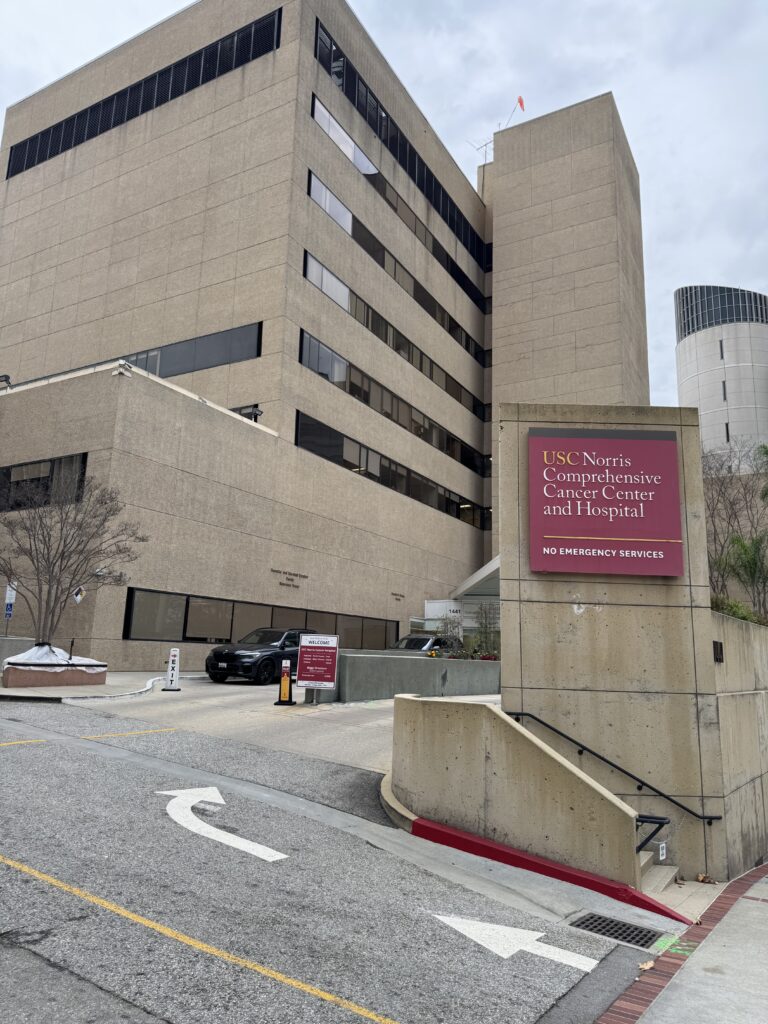
USC Norris Cancer Center — one of the early enterprise environments where I supported large-scale infrastructure and user systems during the early days of my IT career.
Infrastructure in the Real World
After years of school, sacrifice, and helping people fix computers for free, my first real opportunity in IT finally arrived.
At the time, I was still attending Los Angeles College full time during the week and Devry Institute of Technology full time on weekends, while raising my children and trying to build a future in technology.
My first professional role came with a 90-day probation period, where I had to prove I could provide help desk and network support across the Los Angeles area.
My title was PC/Network Specialist, supporting over 900 users.
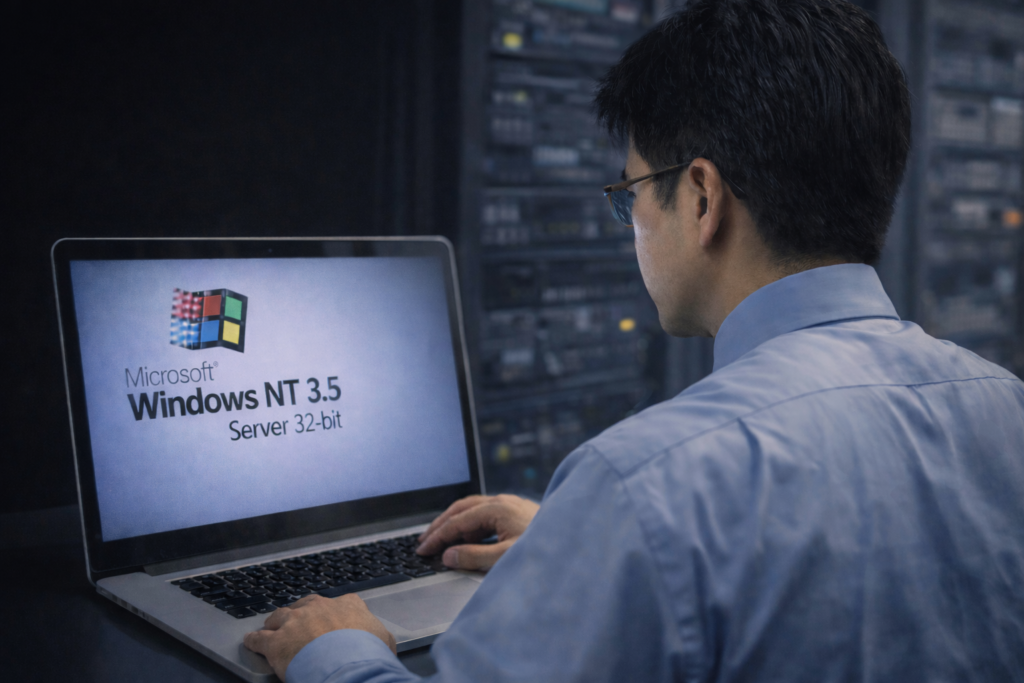
Early infrastructure days at USC. Back then, the datacenter dress code was simple but strict: long-sleeve shirt and tie, even while working with DEC Alpha servers and Windows NT systems. This was where discipline in both technology and professionalism began.
This was during the early infrastructure era of enterprise computing. Our environment included:
Windows NT 3.5 servers
DEC Alpha servers
Cisco ASA firewall
Cisco switches
Exchange Server 5.0
Windows desktop deployments
We were operating in what was called a MAN — Multi-Area Network — connecting multiple locations across the region.
This was infrastructure work in its pure form.
School, Work, and Discipline
My schedule during those years was intense.
Work: 8 AM to 5 PM LACC classes: Monday, Wednesday, Friday, and Tuesday/Thursday evenings Devry classes: Saturday and Sunday all day
There was almost no downtime.
Because I maintained an average 4.4 GPA, I was eventually allowed to attend only midterms and finals for many IT courses, which opened something unexpected.
Opportunity.
Consulting Across the Country
From 1996 to 1998, I began consulting with Korn Ferry International, traveling across the country to help roll out Windows 95 deployments.
I was sent to:
Manhattan, New York
Washington, DC
Houston, Texas
Menlo Park, California
Twin Cities, Minnesota
This was during a time when software piracy was rampant, and companies urgently needed IT professionals to modernize their systems.
Demand for infrastructure skills was exploding.
Career Momentum
Opportunities started coming quickly.
Southern California Edison made an offer. USC matched the pay.
But in July 1999, GTE (now Verizon) made an offer that was too strong to refuse.
By December 1999, I was working as a Network Engineer, responsible for infrastructure from Woodland Hills to Camarillo, California.
That role didn’t last long — not because of failure, but because another opportunity appeared.
An aerospace company in Carson, California offered me a six-figure salary to manage:
Exchange Server 5.5
multi-state infrastructure
enterprise messaging systems
Their locations included:
Carson, CA
Lakewood, CA
Tucson, AZ
Peekskill, NY
Bothell, WA
I was constantly traveling.
Week 1 — California Week 2 — Arizona Week 3 — New York Week 4 — Washington
I was living in the friendly sky.
The Cost of Success
During this time, my fourth child was born.
And that’s when I realized something difficult.
My career was growing fast — but I was missing time with my family.
By 2001, I made a decision.
I stepped away from that life and started my own IT business.
Not because I didn’t love technology — but because I needed balance.
What Infrastructure Really Means
When people ask what the Infrastructure path in IT looks like, this period of my life is the answer.
It means:
supporting systems that must never fail
traveling when things break
building networks that connect organizations
managing communication systems people depend on
being on call when nobody else can solve the problem
Infrastructure is not glamorous — but it is essential.
And it builds resilience.
Looking Ahead
In Part 3, I’ll share what happened after leaving corporate IT in 2001 — when I started my own IT business and discovered a different side of technology and service.
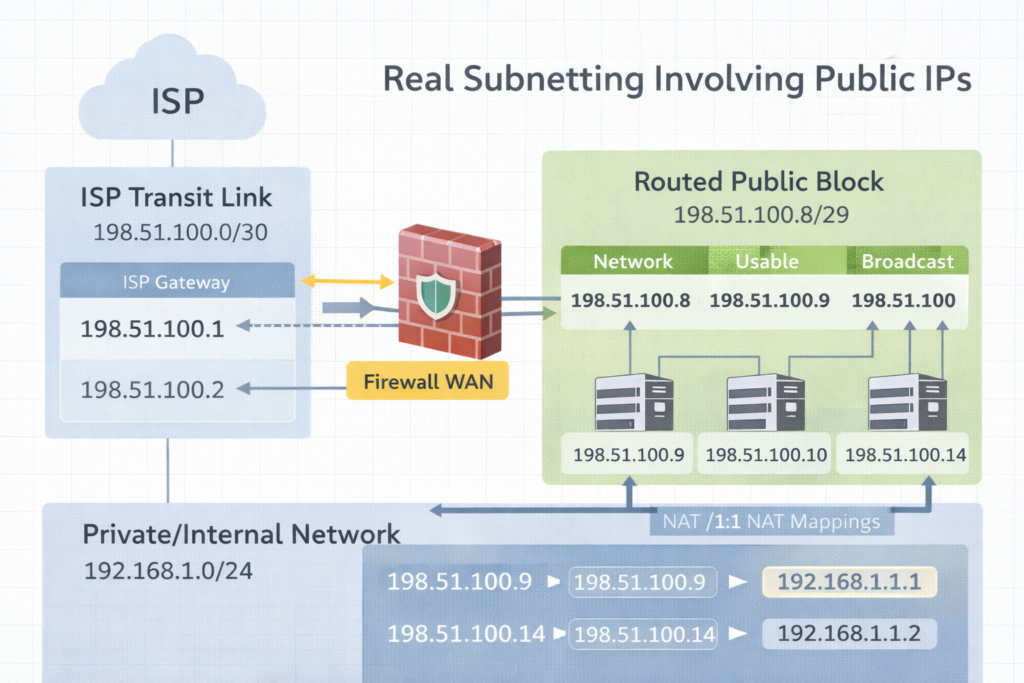
Subnetting in the real world. A /30 is the transit bridge to the ISP. The routed /29 is the public space you actually use behind the firewall.
Excerpt Subnetting clicks when you stop treating it like math and start treating it like design. The moment you get public IPs from an ISP like Comcast, you realize there are two stories happening at once. The transit link that connects you to the ISP, and the routed public block you can actually use inside your firewall.
Intro Subnetting is the practice of dividing an IP space into smaller networks so routing, security, and growth stay predictable. That sounds academic until you get a real ISP handoff and suddenly someone says, “Here’s a /30,” and you discover you only get one IP you can assign. Then they also give you a /29, and you are told those are your public LAN IPs, but they do not live on your WAN port the way you think they do.
This post will make that feel normal.
Notes from the Author Subnetting became real for me when Comcast handed us public IP space and the physical reality did not match the training diagrams. I learned there is a difference between an ISP transit network and a routed block. Once you see that difference, /29 and /30 stop being confusing and start being tools.
Perspective What is subnetting Subnetting is splitting a network into smaller networks by borrowing bits from the host portion and adding them to the network portion. The prefix length, like /24 or /30, tells you how many bits are network bits.
Why it is necessary
Routing clarity Routers make decisions based on networks, not individual IPs.
Security boundaries Separate systems by function. Users, servers, guests, printers, management.
Broadcast control Smaller broadcast domains reduce noise and improve performance.
Clean growth You can expand without renumbering everything if you plan.
Two ISP stories you must separate Story 1: The transit link, often a /30 or /31 This is the point to point connection between your firewall WAN interface and the ISP. It is not your “public LAN block.” It is just the link.
Story 2: The routed block, often a /29, /28, or larger These are the public IPs you can use for NAT, 1:1 mappings, public services, or DMZ addresses. The ISP routes that block to you through the WAN link.
This is why people say, “Comcast gave me a /30 and I only have one usable IP.” In a /30 there are 4 addresses total. Two are usable, but one is almost always used by the ISP side, and the other is used by your WAN interface. That leaves you with only one you can assign on your equipment, which makes it feel like “one usable.” That is normal.
Practice Today (Not Someday) Here are easy to very difficult examples with answers. Read them in order. The goal is understanding, not speed.
Example 1, easy Network: 192.168.1.0/24 Question: How many usable IPs, and what is the usable range
Example 2, easy to medium Requirement: at least 50 devices Base: 192.168.10.0 Question: What prefix fits, and what is the first subnet range
Answer Need at least 50 hosts. Next power of two is 64 addresses. 64 addresses means /26. Mask: 255.255.255.192 First subnet: 192.168.10.0/26 Network: 192.168.10.0 Broadcast: 192.168.10.63 Usable: 192.168.10.1 to 192.168.10.62
Example 3, medium Network: 10.20.30.0/27 Question: What is the usable range and how many usable IPs
Answer /27 means 32 addresses Usable: 30 Network: 10.20.30.0 Broadcast: 10.20.30.31 Usable: 10.20.30.1 to 10.20.30.30
Example 4, public IP reality check, /30 transit Comcast gives you: 203.0.113.8/30 Question: What are the four addresses, and which one do you typically put on your firewall WAN
Answer /30 is 4 addresses total, increments of 4 Block: 203.0.113.8 to 203.0.113.11
Network: 203.0.113.8 Usable: 203.0.113.9 and 203.0.113.10 Broadcast: 203.0.113.11
Typical assignment ISP gateway: 203.0.113.9 Your firewall WAN: 203.0.113.10 This is why it feels like you only got one usable IP. You only got one usable IP for your side. The other usable belongs to the ISP side.
Example 5, common ISP setup, /30 transit plus routed /29 Comcast gives you two things
Transit: 198.51.100.0/30
Routed block: 198.51.100.8/29 routed to your WAN IP
Question A: What goes on the WAN interface Question B: What is the usable range of the /29 and how do you actually use it
Answer A, WAN interface Transit /30 block is 198.51.100.0 to 198.51.100.3 Network: 198.51.100.0 Usable: 198.51.100.1 and 198.51.100.2 Broadcast: 198.51.100.3
Typical ISP gateway: 198.51.100.1 Your WAN: 198.51.100.2
Answer B, routed /29 /29 is 8 addresses total, increments of 8 Block: 198.51.100.8 to 198.51.100.15 Network: 198.51.100.8 Broadcast: 198.51.100.15 Usable: 198.51.100.9 to 198.51.100.14
How you use it These /29 addresses usually do not get placed directly on the WAN interface. Instead, the ISP routes that entire /29 to your WAN IP on the transit /30. Then inside your firewall you can use them for:
1:1 NAT mappings to internal hosts
Public VIPs on a DMZ interface
NAT pools
Assigning a public IP to a specific service
The key phrase you ask Comcast for is: “Confirm the routed block is routed to my WAN IP and provide the next hop.” That next hop is your WAN IP on the /30.
Example 6, difficult, find the /29 block and answer fast Given public IP: 64.71.22.14/29 Question: What is the network, broadcast, usable range
Answer /29 increments by 8 in the last octet Find the nearest multiple of 8 less than or equal to 14 8 and 16 bracket it, so network is 8
Network: 64.71.22.8 Broadcast: 64.71.22.15 Usable: 64.71.22.9 to 64.71.22.14
Example 7, difficult, build a WAN /30 from a random IP You are told your WAN IP is 75.120.44.6/30 Question: What is the /30 block and what is the ISP gateway likely to be
Answer /30 increments by 4 Nearest multiple of 4 less than or equal to 6 is 4 So block is 75.120.44.4 to 75.120.44.7
Network: 75.120.44.4 Usable: 75.120.44.5 and 75.120.44.6 Broadcast: 75.120.44.7
Likely ISP gateway: 75.120.44.5 Your WAN: 75.120.44.6
Example 8, very difficult, design for two ISPs with clean routing Requirement
ISP1 gives transit /30 and routed /29
ISP2 gives transit /30 and routed /29 You want to publish two services, one primary on ISP1, one primary on ISP2, with failover possible later.
Answer concept
Put only the transit /30 on each WAN interface
Confirm each routed /29 is routed to the correct WAN IP
Publish Service A using a public IP from ISP1 routed /29 with 1:1 NAT to internal host
Publish Service B using a public IP from ISP2 routed /29 with 1:1 NAT to internal host
Keep internal addressing private RFC1918 and do not mix public blocks inside LAN unless you have a real DMZ plan
Make sure the firewall supports policy based routing or proper default route tracking if you plan failover
This is where subnetting meets design.
Final Reflection Subnetting is not about counting. It is about ownership. When you know which addresses belong to the link, which belong to your routed block, and which belong to your internal network, you stop feeling confused. You start feeling calm.
Pocket I’m Keeping The /30 is the bridge. The routed /29 is the usable land.
What I Hear Now I can design this with intention. I can separate the transit from the routed block. I can explain it clearly to anyone on the team.
One of my favorite seasons of my life. Serving the city, keeping critical systems alive, and learning the foundations that shaped who I am as an engineer today. Every console screen taught me something new and every problem strengthened my desire to help others through technology.
My Essential IT Troubleshooting Guide
In every company I have worked for, the tools that saved the day were not fancy dashboards but simple commands and fundamentals I could trust. This is my personal troubleshooting arsenal, written so even a non technical reader can follow the logic behind what I do.
Each section answers three things • What it is • Why it matters • How I use it in real life
Name Resolution Basics
A record
What • A record is a phone book entry that says “this name belongs to this IP address.”
Why • Users remember names better than numbers. If the A record is wrong or missing, they land in the wrong place or nowhere.
How I use it • When a site is not loading, I ping the name and check if the IP address matches what we expect. • If it does not, I fix the A record in DNS and wait for it to replicate.
CNAME
What • A CNAME is a nickname that points one name to another name.
Why • It lets you move services without breaking users. The public name stays the same while the target changes behind the scenes.
How I use it • For services like autodiscover or app portals, I often see CNAMEs that point to Microsoft or another provider. • When something breaks after a cutover, CNAMEs are one of the first things I verify.
DNS
What • DNS is the global phone book that turns names into IP addresses.
Why • If DNS fails, everything feels broken. Browsers, Outlook, file shares, all of them depend on DNS.
How I use it • I run nslookup name.company.com to see which DNS server is answering and what IP it returns. • If users in one site can reach something and other users cannot, I compare DNS answers between locations.
Hosts file
What • The hosts file is a tiny local phone book on the computer.
Why • It overrides DNS for that machine. One bad line can send traffic to the wrong place.
How I use it • Location on Windows
C:\Windows\System32\drivers\etc\hosts
• I open it with Notepad as administrator. • If someone hard coded a testing IP and forgot about it, I comment it out or remove it, then flush DNS.
Flush cache
ipconfig /flushdns
Nbtstat and TCP IP
What • Nbtstat is an older tool for NetBIOS name resolution. • Hard coded TCP IP means a manual IP instead of DHCP.
Why • Nbtstat helps when legacy name lookups act strange. • Hard coded IPs can cause conflicts or make VLAN changes painful.
How I use it • nbtstat -n to see local NetBIOS names. • nbtstat -c to see the name cache. • When I find static IPs on client machines, I document them and move them to DHCP reservations so the network is easier to manage.
Network control panel shortcut
I still use this every week
From Run
ncp.cpl
It opens the Network Connections window so I can quickly check adapters, enable or disable, or look at IPv4 settings.
DHCP Essentials
What • DHCP hands out IP addresses, gateways and DNS to clients.
Why • If DHCP fails, users cannot get on the network or suddenly have duplicate addresses.
Best practices • Use at least two DHCP servers where possible. • Define scopes with correct gateway and DNS. • Use reservations for printers and key servers.
Commands I use on clients
ipconfig /release ipconfig /renew
If a user can reach the internet but not internal resources, I check that DNS from DHCP is internal and not a public resolver.
MX, Autodiscover and Mail Flow
MX record
What • MX tells the world which server receives mail for your domain.
Why • If MX points to the wrong place or has a low priority backup you forgot, email can vanish or queue.
How I use it • I use MXToolbox to check MX records and verify that they point to Exchange Online or the correct email gateway.
Autodiscover
What • Autodiscover tells Outlook where to find the mailbox and settings.
Why • A broken autodiscover record means constant password prompts or profile creation failures.
How I use it • I verify the Autodiscover CNAME or SRV record. • I test with Outlook connectivity tools or Test-OutlookConnectivity when available.
Hunting spam engines and bad SMTP
Where malware hides • In browser extensions • In Outlook add ins • In unknown services or scheduled tasks that send mail through SMTP
How I clean it without reimaging • Check Outlook add ins and disable anything suspicious. • Run msconfig and Task Manager to review startup items and tasks. • Review SMTP logs on the server to see which host is sending unexpected traffic.
Certificates and SSL in Hybrid Environments
Internal web apps depend on trusted certificates so browsers know the site is safe. When an SSL expires, internal apps stop working and Chrome or Edge will show warnings.
Why we create new SSLs • Internal web apps must be trusted. • Intranet portals and legacy apps often stop working when an internal CA certificate expires. • External issued certs from DigiCert or GoDaddy are trusted by browsers.
Where I keep it • C:\Certs or another controlled folder • Never leave certificates scattered in Downloads
Core servers • I open Task Manager with Ctrl Shift Esc • File, Run, then mmc • Add the Certificates snap in and import there Or I import directly with PowerShell.
Machine Trust Relationship Problems
When Windows says “the trust relationship between this workstation and the primary domain failed,” the computer account and the domain no longer agree.
On a traditional domain • Disable LAN and WiFi • Log in using cached credentials • Reset the local admin password if needed • Disjoin from the domain and put it in a workgroup • Reboot • Join it back to the domain
For Azure AD joined devices
Check status
dsregcmd /status
If broken
dsregcmd /leave
Then re join from Settings under Access work or school.
RDP Session Cleanup
Sometimes users cannot remote into their office desktop because a stale session is still connected.
After that, they can reconnect without rebooting the server.
Active Directory Tools
ADSIEdit
What • A low level editor for Active Directory objects.
Why • Last resort for fixing broken attributes or lingering records when normal tools cannot reach them.
How I use it • Only with full backups and a clear change plan. • I use it to clean up orphaned objects or legacy settings left behind.
Event Viewer
What • The black box recorder of Windows.
Why • Every blue screen, login failure, replication problem and service crash leaves a trace here.
How I use it • eventvwr.msc • I focus on System and Directory Service logs on domain controllers, and Application logs on servers hosting apps.
FSMO Roles
What • Flexible Single Master Operations are special AD roles for schema, naming, PDC, RID and infrastructure.
Why • These make sure there is one source of truth for sensitive changes.
Best practice • Know exactly which DC holds each role. • Protect those DCs like crown jewels.
If a FSMO owner is gone forever • You can seize the role to a healthy DC using ntdsutil. • After seizing you never bring the old DC back online.
This is rare but every senior engineer should know the process in theory.
AD and Entra ID Health
On premise AD health
dcdiag repadmin /replsummary repadmin /showrepl
I always confirm • DNS is correct • SYSVOL is in sync • Time is correct and within a few minutes across all DCs
Entra ID health
Connect-MgGraph Get-MgUser Get-MgDirectoryAudit
I check • Sign in logs for failures • Conditional Access for blocked locations • Device compliance for machines that suddenly appear non compliant
AD controls computers and users on site. Entra controls cloud identity and device trust. In a hybrid world, both must be healthy.
Azure and Terraform
Azure CLI read only commands
az login az account show az group list az vm list az storage account list
These tell me what exists without changing anything.
Terraform for infrastructure as code • Initialize the directory terraform init • Format terraform fmt • Validate terraform validate • Plan terraform plan
Nothing changes until terraform apply is run. For interviews, being comfortable with init, plan and validate already shows good understanding.
Microsoft 365 Services
Group Policy
Purpose • Central control of security and settings for on premise joined machines.
How I create it gpmc.msc • New GPO • Edit with the settings I want • Link to the correct OU
Universal Print
What • Cloud based printing that removes the need for classic print servers.
Why • Easier management for hybrid and remote users.
I register printers in Universal Print and assign permissions based on groups, so users can get printers automatically.
SharePoint Online
Steps I follow • Go to Microsoft 365 admin center • Open SharePoint admin • Create a new site • Assign owners and members • Set sharing and retention policies
This becomes the central place for team documents and intranet content.
OneDrive and Data Migration
OneDrive • Sync client installed on machines • Known Folder Move for Desktop, Documents and Pictures • Version history to protect from mistakes and ransomware
Migrating data • I prefer SharePoint Migration Tool or Mover. • I clean old data first so I do not carry garbage into the cloud. • I communicate to users what will move and what will not.
Why This Arsenal Matters
These are the tools I have relied on in city government, banks, energy drinks, and manufacturing. They are not fancy, but they work.
Every time I help a user reconnect, restore a service, or clean up a broken configuration, I am really doing three things
• Protecting the company and its data • Supporting my teammates so they are not alone in the fire • Honoring the gift God gave me to understand and fix complex systems
This arsenal is how I serve. Whether I am helping a small office or a multi site enterprise, the pattern is the same ask good questions, run the right checks, fix the root cause, and leave clear notes so the next engineer can see the path.