Introduction The AzureAD PowerShell module has served IT administrators for years, but it’s now officially deprecated in favor of the Microsoft Graph PowerShell SDK. While the change may feel like another “cloud shuffle,” migrating your scripts is not just a compliance move — it’s your ticket to a more powerful, secure, and future-proof automation toolkit. In this post, I’ll walk you through the essentials of converting your Azure AD scripts to Microsoft Graph, with clear side-by-side examples.
Why Migrate?
Future Support: Microsoft Graph is actively developed; AzureAD is on life support.
Unified Endpoint: Graph covers Azure AD, Intune, Exchange Online, Teams, and more in one API.
Security: Better authentication methods, including secure app registrations and least-privilege scopes.
Step 1 – Install Microsoft Graph PowerShell
# Install the module
Install-Module Microsoft.Graph -Scope CurrentUser

# Update if already installed
Update-Module Microsoft.Graph

# Connect with interactive sign-in
Connect-MgGraph -Scopes "User.Read.All", "Group.ReadWrite.All"

# Confirm connection
Get-MgContext
Only request the scopes you actually need — this aligns with least privilege best practices.
Step 4 – Testing and Verification Before replacing scripts in production, run them in a test tenant or a non-production environment. Compare outputs from AzureAD and Graph to ensure parity.
Conclusion Migrating from AzureAD to Microsoft Graph PowerShell is more than just a rewrite — it’s a forward-looking investment. Once you adapt, you’ll unlock richer APIs, cross-service automation, and security benefits that AzureAD simply can’t match. My advice? Start small: pick one script, convert it, and test until you’re confident. Once you see the gains, the rest will follow naturally.
For official guidance and best practices from Microsoft, check out these resources:
Minutes before boarding at Salt Lake City International Airport, I received an urgent text about a disabled Azure AD account. I opened my laptop, tethered to my phone’s hotspot, connected to Cisco VPN, and got to work—resolving the issue securely without relying on public Wi-Fi
Introduction: Last Friday, just as I was getting ready to board my flight to JFK from the Salt Lake City airport, I received a message from an end user:
“I think I’m blocked. I can’t access Outlook, Teams, or OneDrive.”
Time was limited, and I was already seated at the gate with my laptop ready. Instead of panicking, I tethered through my phone’s personal hotspot and launched Cisco AnyConnect VPN. I deliberately avoided the airport’s public Wi-Fi to reduce the risk of a security breach.
Once I authenticated and connected securely, I logged into Azure. I discovered that the user’s account in portal.azure.com was disabled. Fortunately, there are two ways to quickly resolve this kind of issue:
✅ Method 1: PowerShell (Quickest & Most Efficient)
If you have the AzureAD or Microsoft Graph PowerShell module installed and proper permissions, this method is the fastest.
Step-by-step using Microsoft Graph PowerShell:
# Connect to Microsoft Graph
Connect-MgGraph -Scopes "User.ReadWrite.All"

# Re-enable the disabled account
Update-MgUser -UserId [email protected] -AccountEnabled $true
Note: Replace [email protected] with the actual UPN or Object ID of the affected user.
Advantages:
Fast (under 30 seconds)
No GUI needed
Can be scripted for multiple accounts
🧭 Method 2: Azure Portal (GUI Approach)
If you’re not ready to run PowerShell or don’t have the module available, the Azure Portal offers a visual way to fix it.
Both approaches—PowerShell and the Azure portal—get the job done. However, for IT professionals constantly on the move, PowerShell is king. It’s fast, efficient, and doesn’t rely on a graphical interface.
That said, having the flexibility to switch between GUI and scripting tools is essential. Some situations demand precision and speed; others might call for a visual confirmation or audit trail.
In the end, what matters most is being prepared. Whether you’re at your desk or at an airport gate, the ability to jump in and resolve an issue on the fly is what defines a reliable IT Engineer.
Intro: When internal emails from trusted coworkers suddenly stop showing up in your focused inbox or fail to trigger your Outlook rules, it’s easy to miss critical messages. In my case, one sender was previously blocked due to a spoofing incident, and although removed from the block list, her messages were still bypassing my folder rules—buried in the inbox. Message Trace confirmed the emails were delivered, but not filtered correctly. Here’s how I resolved the issue using PowerShell.
🔍 Problem Recap:
Despite the sender being trusted and allowed, her emails:
Skipped my Outlook inbox rules
Did not show up in Focused Inbox or designated folders
Were confirmed delivered via Message Trace
Were previously on the Blocked Sender List, but later removed
The Exchange Admin Center (EAC) didn’t offer the flexibility I needed to create an accurate spam bypass rule. So I switched to PowerShell.
🛠️ Solution: Create a Transport Rule via PowerShell
Instead of struggling with the limited dropdowns in the modern Exchange portal, I used the New-TransportRule cmdlet to create a spam filter bypass rule in just a few lines.
Conclusion: PowerShell remains the most powerful tool in any IT administrator’s arsenal—especially when the GUI can’t keep up. If you ever run into stubborn mail delivery or spam issues, consider creating targeted transport rules using PowerShell. It’s fast, clean, and gets the job done without frustration.
Confidence is earned — often forged in quiet moments when no one’s watching. Often, it’s forged in quiet moments when no one’s watching. Whether I’m at a blank PowerShell console or gripping a loaded barbell, the principle is the same: discipline, consistency, no shortcuts.
I’ve Always Been an ABC Person
I’ve always lived by three words: Always Be Curious.
That curiosity pulled me into IT. I lacked credentials, but I had grit and a drive to learn. I’ve never believed in shortcuts — not in spiritual growth, troubleshooting IIS, or transforming your body. Temporary fixes cover symptoms — but they rarely solve the root cause.
You don’t fix problems with assumptions, Google, and a quick prayer. You fix them with logs, tools, and patience. That’s what I’ve learned — the hard way — through years of trial, error, and persistence.
Why I Don’t Believe in Band-Aid Fixes
Quick fixes fade fast. They treat symptoms, not root problems. Take IIS, for example — a broken SSL binding or 503 error might vanish temporarily, but it usually comes back with greater risk.
That’s why I value discipline over speed. Precision over panic.
It’s the same principle my son applies as he preps for his first fitness competition. He doesn’t rely on shortcuts or crash diets. And definitely no “quick fixes” to look lean. Just clean eating, consistent training, and unwavering focus — day in and day out.
Watching him chase excellence reminds me of my early days — hungry, overlooked, and determined to make noise through results, not volume.
I didn’t wait for permission—I made my own path. I spoke up when others stayed silent, dove into neglected technologies…, and taught myself to harden and scale IIS in real-world, high-pressure environments. I wasn’t the loudest voice in the room, but I became the go-to problem solver—delivering solutions that worked the first time.
Triple D: Discipline. Dedication. Determination.
Tonight’s fuel: Baked Atlantic salmon with lemon, garlic, and power greens — topped with walnuts and 42g of clean protein. Discipline doesn’t stop at the keyboard — it continues at the dinner table.
Confidence isn’t found. It’s forged — through repetition, patience, and precision. Knowledge doesn’t come overnight. Much like getting fit, it takes what I call the Triple D: Discipline. Dedication. Determination.
Tonight’s early dinner? Fresh Atlantic salmon baked with lemon, garlic, and a bed of power greens. To boost nutrients, I topped it with walnuts and washed it down with 42g of Fairlife protein. I eat twice a day — every bite calculated, nutrient-packed, and designed for peak performance..
As for training, I’m in the zone six days a week — no shortcuts. Mostly bodyweight: push-ups, sit-ups, glute bridges, crab walks, planks, and shadow boxing. I train with intensity — until the burn says I’m done..
That’s how I’ve kept my edge for decades — by showing up, sweating, and sticking to the plan.
You train your body the way you train your mind. Log files are your feedback loop. Errors are your instructors. Study. Adapt. Try again.
That mindset shapes how I approach IT and life.
Bruce Lee Said It Best
“If you always put limits on everything you do — physical or anything else — it will spread into your work and into your life. There are no limits. There are only plateaus, and you must not stay there, you must go beyond them.” — Bruce Lee
I carry that with me daily. In both IT and fitness, mastery is a moving target — the moment you think you’ve arrived, growth demands a new challenge.
My Son’s Grit, My Quiet Pride
24 days out from competition.
“Starvation is at its highest for me… it feels like I’m crawling my way to survive all day long. This is the toughest sport I’ve ever experienced.”
Those are the words my son texted me as he prepares for his upcoming debut at TheFitExpo in Anaheim on August 2, 2025.
His commitment to clean eating, intense workouts, and honest prep — no shortcuts — mirrors the way I built my IT career: with sweat equity.
He used to dominate dance stages as a four-time All-Male hip-hop champion with West Covina High School. After college, he became a CNA and now works as a gym personal trainer — turning his passion for fitness into purpose. He’s carrying the torch of discipline — and I couldn’t be prouder.
From IIS to Iron: A Shared DNA
Take IIS — often dismissed as legacy tech, yet it powers critical internal systems beneath the buzzwords. But the reality is, it still powers critical internal applications..
When it breaks — when HTTP 500 errors fill your logs — assumptions won’t fix it. First, trace the issue. Dig through the logs. Slow down. Understand the root cause — then take action.
That’s the same mental muscle my son flexes in the gym. He logs his intake. Monitors results. Makes adjustments.
We train differently — I with bodyweight and discipline, he with prep meals and physique goals. The goals differ — but the grit is the same.
Here’s a script I wrote to search the most recent IIS log file for errors — the same kind of tool I use to avoid assumptions and find the real issue:
🧰 PowerShell Script: Digging Through IIS Logs
# Find the latest IIS log and search for error codes
$LogPath = "C:\inetpub\logs\LogFiles\W3SVC1"
$LatestLog = Get-ChildItem -Path $LogPath -Filter *.log | Sort-Object LastWriteTime -Descending | Select-Object -First 1
Select-String -Path $LatestLog.FullName -Pattern " 500 " | Select-Object LineNumber, Line
If it’s worth fixing, it’s worth fixing the right way.
Conclusion: Carry On
This week’s Church hymn, “Carry On,” stirred something quiet in me — It reminded me that sometimes, the holiest thing we can do is simply hold our ground. It reminded me:
It reminded me:
“Firm as the mountains around us, Stalwart and brave we stand…”
We don’t walk this path alone. Others cleared the way — now it’s our turn to keep going.
This isn’t about spotlighting effort. It’s for the ones working in silence. In server rooms. In waiting rooms. In small spaces where no one claps.
The message doesn’t seek attention — it invites action: carry on.
They say when you see a man on top of the mountain, he didn’t fall there.
He planned the climb, stumbled on jagged trails, and kept going even when the sky turned gray.
This post isn’t just about photography, or starting a new role, or PowerShell scripts. It’s about finding your footing again when life shakes your routine—whether you’re debugging a script, chasing stars at 2AM, or collecting a laptop that brings back a hundred memories.
You’ll find stories about IT challenges, career shifts, Milky Way photography, emotional storms—and most of all, how to rise above the blues when everything feels heavy.
Carrying the gear, chasing the stars—because purpose isn’t found at the summit, it’s carried every step.
⛰️ New Job, New Mountain
They say starting a new job is like standing at the foot of a mountain. The view is exciting—but the climb? Uncertain.
No one really tells you what it feels like to start over. You’re learning people, process, and pace all at once. Even if you’re an expert, you’re blind on day one. And if you’re in IT, like me, the terrain can feel like a minefield.
Pros:
A fresh start
The chance to sharpen or add new skills
A clean slate to prove your value again
Cons:
Culture shock
Pressure to perform quickly
Emotional whiplash, especially when you’re still letting go of the last place
I’ve lived this cycle more than ten times—moving from job to job, project to project. From my first IT gig where I got fired after just a few days (yes, really), to roles in telecom, manufacturing, finance, education, government, and now infrastructure engineering—every restart brought unexpected lessons.
That early firing? It broke me. But it built me too. It taught me to expect the unknowns. It made this scripture real to me:
“For of him unto whom much is given much is required.” – Luke 12:48
And that’s what they don’t tell you: Starting a job doesn’t just mean you’re on probation— it means you’re learning the language, the culture, the personalities, and the systems. Sometimes you’re expected to run before you even learn where the shoes are.
So how do I handle it?
Soft skills. Empathy. Active listening. And above all, humility.
The technical side is always tough, but people are the real challenge. Knowing how to adapt, how to read the room, and when to ask versus when to figure it out—those are the survival tools.
“If ye are prepared ye shall not fear.” – D&C 38:30 That verse? It’s more than a motto. It’s how I show up—every first day, every new login, every fresh deployment.
I’ve seen people not make it past the 90-day mark. Sometimes they didn’t fit. Sometimes the job was the problem. Sometimes—let’s be honest—they oversold their résumé, got lucky at the interview, and then the real work revealed the truth.
Others just get carried by the blues—barely holding it together until their tank runs empty.
That’s why preparation matters. You don’t go to war without gear. You don’t climb a mountain without checking your boots. And you don’t start a new role without anchoring your mindset.
Finally, land where you love. A job shouldn’t just pay the bills — it should fuel your purpose. When you love what you do, it’s a win-win: You rise, and so does the company.
But if you’re stuck in a rut just to make ends meet… eventually, it drains more than your energy — it drains your spirit.
So don’t just look for a job. Climb toward work that gives you life.
A glimpse of the heavens through earthly shadows—chasing the Milky Way isn’t just about light, it’s about learning to see in the dark.
🌌 Chasing the Milky Way
There’s something sacred about standing in the desert with the Milky Way overhead.
I’ve chased it from Joshua Tree in California to Grand Canyon in Arizona, Monument Valley in Utah, and Moab—and every time, I feel the same awe.
My process is disciplined and deliberate. I survey the area in daylight, using the PhotoPills app to map the galactic core. Then I visualize my composition, mark the safest route from the car, and prep all my gear.
Primary lens: Nikon 14-24mm f/2.8G
Backup: Nikon 24mm f/1.4G
Tripod, remote shutter, red LED headlamp
Pre-focus and manual mode to avoid lens hunting
ISO, shutter speed, aperture—all dialed in
Everything is anticipated—just like in IT. One missed step, and the whole shot—or system—can fail. Just seeing the Milky Way with your own eyes is breathtaking—but to compose it meaningfully, that takes skill.
A great Milky Way shot is not just about stars— it’s about how you prepare in the dark.
🛠 When PowerShell Becomes Armor
It’s Monday morning. Your inbox is full. A user can’t log in, the SQL service is down, and your boss wants answers.
If you’re not ready, it feels like going to war without armor.
That’s where PowerShell becomes your weapon.
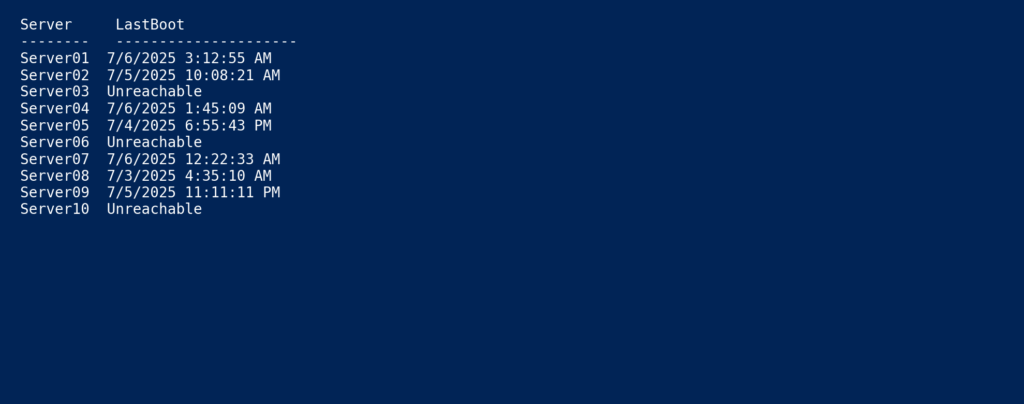
Let’s say you’re troubleshooting remote system uptime across 50 servers. Instead of logging in one by one:
📊 Real-time uptime scan across multiple servers using PowerShell – one script, instant clarity.
In just 10 seconds, you’ve got eyes on the entire server fleet. Who’s up. Who’s down. Who’s silent. The sharp tech doesn’t panic—he pinpoints, isolates, and executes. Fast. Focused. Fix deployed.
PowerShell isn’t just a tool—it’s your recon drone.
Like photographing the Milky Way, the best troubleshooting happens when everything is ready before chaos begins.
🎈 Rise Above the Blues
You’re not a machine. You weren’t built to be immune to fear, fatigue, or failure.
Unlike AI, we can’t predict everything. Life throws us emotional landmines—doubt, loneliness, weariness, fear and grief. And sometimes, it hits out of nowhere. A memory. A song. A walk past an empty office.
But here’s what I’ve learned:
You don’t need to erase the blues— you rise above them.
Just like launching a balloon skyward, it takes intention:
You eat clean even when you feel messy.
You work out even when your spirit is sore.
You create even when motivation lags.
And yes, you kneel—asking God for strength.
Whether you’re debugging a failed script, standing under a galaxy of stars, or simply trying to make it through a quiet night…
💪 The Endurance Factor
Endurance isn’t just for the gym — it’s a mindset I carry into every part of my life. Whether I’m hammering out code at 2AM or waiting patiently for the perfect light in photography, the principle is the same: lasting through the grind matters more than talent alone. Battle rope training reminds me that breakthroughs come after fatigue — in the gym, in IT, and behind the lens. Those who endure, evolve. Those who push past comfort zones, create lasting impact.
Each battle rope rep runs 180 seconds — just like a boxing round. I push through up to 6 rounds, simulating the intensity of a 12-round fight. It’s not just training — it’s conditioning for IT, for life, for the moments when quitting is easier. Endurance is the quiet strength behind every breakthrough.
🎯 Precision Under Pressure: Shooting, Striking, and Showing Up
Whether I’m at the range or on the mat, the ritual is the same: Prepare. Focus. Repeat.
When I train with my pistols, I practice daily with dummy rounds—loading, unloading, chamber checks, slide control. I break them down, clean them, reassemble them blindfolded—until every movement is instinctive.
It’s the same with MMA and air punching drills. My body is conditioned not just for strength, but discipline. Every strike, every stance, is deliberate. I don’t train to show off—I train to be ready.
You see, when it’s Monday morning and something breaks at work—your system is down, a PowerShell script fails, a teammate’s counting on you—that’s your moment. That’s your live fire.
You don’t rise to the occasion. You fall back on your training.
Whether I’m troubleshooting a crashed server, hiking a steep trail for that perfect Milky Way shot, or helping someone start their climb—discipline is the thread. I’ve learned that showing up prepared is half the victory.
Just like the range:
No second chances if you’re not ready.
Precision comes from practice.
And calm comes from confidence.
🏁 Conclusion
There are mountains I’ve climbed—in IT, in life, and in silence.
From my early days as a PC Support Specialist at USC, through roles in telecom (Verizon), manufacturing (Alcoa), local government (City of West Covina), law firms, education (The Claremont Colleges), our Worldwide Church, regional banking (City National Bank), fintech (Payforward), retail (Monster Energy), global finance (PIMCO), and now as an Infrastructure Engineer in Utah—none of those summits came easy.
Even when I chase the stars with my camera, it’s the climb that makes the view meaningful.
So to anyone out there starting over, picking up the pieces, or doubting their path:
You don’t fall on a mountaintop. You climb it. And you keep climbing. Even when you’re tired. Especially when you’re tired.